Personal project个人项目·Twitch
Eggers
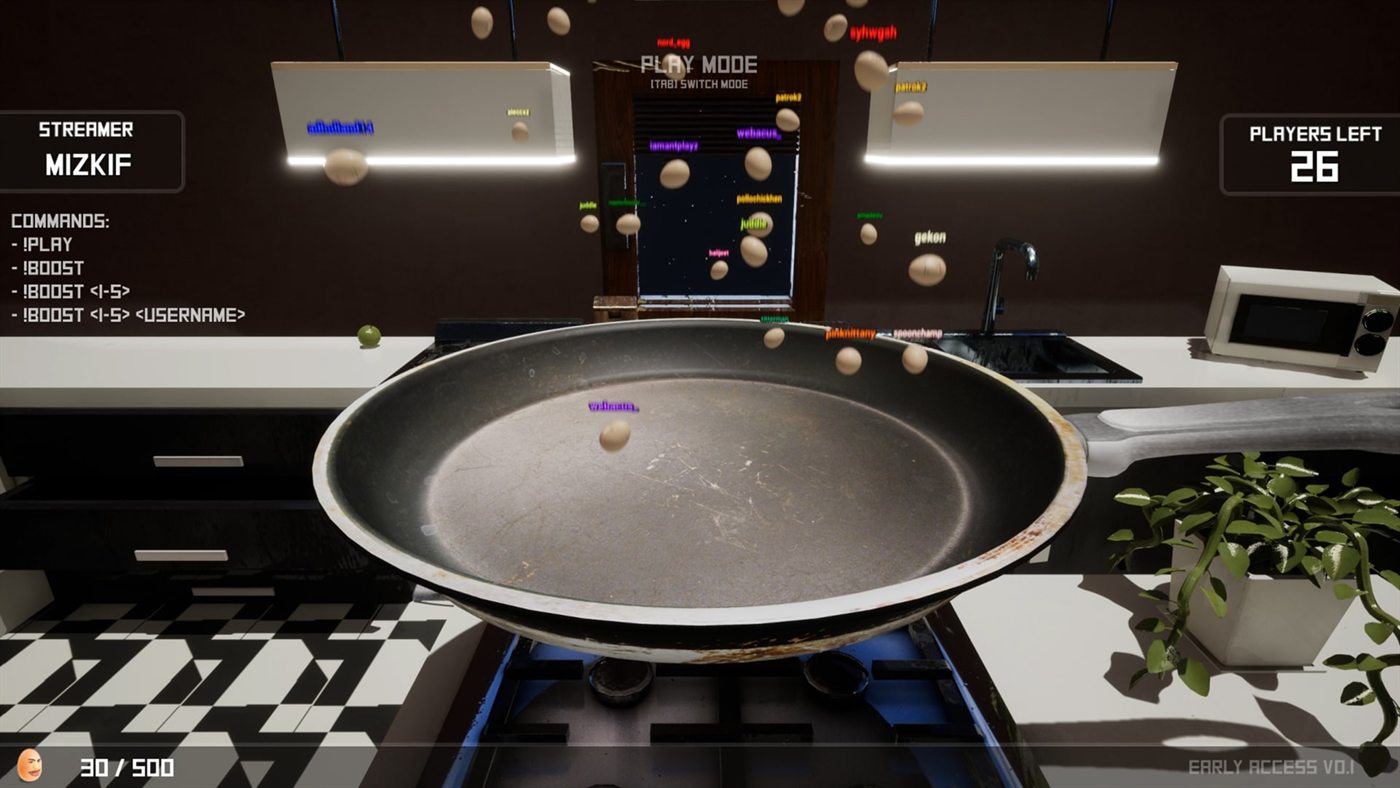
Eggers is a personal project built on the Twitch IRC interface, made as a fan game for streamer "Mizkif" and his audience.
Eggers 是基于 Twitch IRC 接口的个人项目,为主播 “Mizkif” 及其观众制作的同人游戏。
- Resolving interaction for a player base limited to chat commands, and handling 500+ concurrent players by leaning on built-in physics and limited interactions.为只能用 聊天指令交互的玩家人群设计交互方式,并借助内置物理与受限交互承载 500+ 同时在线玩家。
- Experiencing the fluent workflow between C++ classes and Blueprints and how to use their potential properly.实践 C++ 类与蓝图之间的顺畅协作,理解如何正确发挥各自优势。
- Using the Twitch API and documentation to create IRC connections with the Twitch IRC network.根据 Twitch API 与文档,与 Twitch IRC 网络建立 IRC 连接。
- Parsing received client messages and sending properly formatted messages back.解析客户端消息,并返回格式正确的消息。
- Creating interactive interfaces with UMG — scrollboxes, resizability and more.使用 UMG 构建交互界面:滚动列表、可缩放布局等。
Code samples代码示例
IRC listener socket & loginIRC 监听套接字与登录
To start listening to the Twitch IRC chat and parse incoming messages, we connect first, then poll for new chat messages every 0.01s.
要开始监听 Twitch IRC 聊天并解析消息,首先建立连接,然后每 0.01 秒轮询一次新消息。
// Creating endpoint & listener socket
FIPv4Endpoint endPoint{ FIPv4Address(127, 0, 0, 1), 6667 };
m_pListenerSocket = FTcpSocketBuilder(TEXT("TwitchListener")).AsReusable().BoundToEndpoint(endPoint).Listening(8);

// Set buffer size
int32 newSize = 0;
m_pListenerSocket->SetReceiveBufferSize(2 * 1024 * 1024, newSize);

GetWorldTimerManager().SetTimer(m_TimerHandle, this, &APlayerRegisterer::SocketListener, 0.01f, true);

SendLogin();

void APlayerRegisterer::SendLogin()
{
    // Create resolve info
    const FResolveInfo* pResolveInfo{ ISocketSubsystem::Get()->GetHostByName("irc.chat.twitch.tv") };

    // Check if we got a resolving issue
    if (pResolveInfo->GetErrorCode() != 0)
    {
        UE_LOG(LogTemp, Warning, TEXT("ERROR: Couldn't resolve hostname."));
        return;
    }

    const FInternetAddr* address{ &pResolveInfo->GetResolvedAddress() };

    uint32 outIP{};
    address->GetIp(outIP);

    int32 port{ 6667 };

    TSharedRef<FInternetAddr> addr{ ISocketSubsystem::Get(PLATFORM_SOCKETSUBSYSTEM)->CreateInternetAddr() };
    addr->SetIp(outIP);
    addr->SetPort(port);

    m_pListenerSocket = ISocketSubsystem::Get(PLATFORM_SOCKETSUBSYSTEM)->CreateSocket(NAME_Stream, TEXT("default"), false);

    bool connected = m_pListenerSocket->Connect(*addr);
    // Check if we are connected with the socket
    if (!connected)
    {
        UE_LOG(LogTemp, Warning, TEXT("ERROR: Failed to connect with socket."));
        // Close socket if it would be open
        if (m_pListenerSocket)
        {
            m_pListenerSocket->Close();
        }

        return;
    }

    SendString(TEXT("PASS oauth:" + m_AuthKey));
    SendString(TEXT("NICK " + m_UserName));
    SendString(TEXT("JOIN #" + m_StreamerName));

    if (m_TagsEnabled)
    {
        // Enable tags
        SendString(TEXT("CAP REQ :twitch.tv/tags"));
    }
}
Player focus in spectator mode观战模式下的视角切换
In spectator mode we set a view target with a blend to swap which player is focused, by giving each player a small camera that the controller takes over. The HUD then aligns with the array of players and validates the current focus.
在观战模式下,通过为每个玩家创建小型相机并由控制器接管,以混合方式切换当前聚焦的玩家;HUD 与玩家数组同步,并校验当前聚焦是否有效。
void AStreamerSpectatePawn::FocusNext()
{
    if (!m_Spawner->IsValidLowLevel())
        return;

    TMap<FString, ATwitchChatPlayer*> players = m_Spawner->GetPlayers();
    TArray<ATwitchChatPlayer*> twitchPlayers;
    players.GenerateValueArray(twitchPlayers);

    if (twitchPlayers.Num() <= 0)
        return;

    m_CurrentFocus++;
    if (m_CurrentFocus > twitchPlayers.Num() - 1 || m_CurrentFocus < 0)
    {
        m_CurrentFocus = 0;
    }

    m_Controller->SetViewTargetWithBlend(twitchPlayers[m_CurrentFocus], m_BlendTime);
    m_pInGameHud->SetSpectatePlayer(twitchPlayers[m_CurrentFocus]->GetUserName(), twitchPlayers[m_CurrentFocus]->GetChatColor());
    m_FocusedPlayer = twitchPlayers[m_CurrentFocus];
}
Swapping modes模式切换
To let the player swap modes we change state, moving between a normal pawn and a spectator pawn.
通过切换状态,在普通 Pawn 与观战 Pawn 之间切换模式。
void AStreamerController::SwapMode()
{
    // Check if it's in game mode or spectator mode
    if (m_SpectateMode)
    {
        PlayerState->SetIsSpectator(false);
        Possess(m_Pawn);
        ChangeState(NAME_Playing);
        ClientGotoState(NAME_Playing);

        m_SpectateMode = false;
    }
    else
    {
        PlayerState->SetIsSpectator(true);
        ChangeState(NAME_Spectating);
        ClientGotoState(NAME_Spectating);
        m_SpectateMode = true;
    }

    m_pInGameHud->SetSpectatorMode(m_SpectateMode);
}
Boosting chat players为聊天室玩家施加推力
Boosting players through chat commands: the command is parsed first, then applied to the player.
通过聊天指令施加推力:先解析指令,再作用于对应玩家。
void ATwitchChatPlayer::Boost(int strength, const FVector& direction)
{
    // Checking that the strength can not be activated too high
    if (strength > m_MaxBoostStrength)
    {
        strength = m_MaxBoostStrength;
    }
    // Making sure that the strength does not go under 1
    else if (strength <= 1)
    {
        strength = 1;
    }

    // Getting the direction the egg is laying
    FVector dir = m_pStaticMeshComp->GetUpVector();
    if (direction != FVector::ZeroVector)
    {
        dir = direction;
    }

    // Creating a force to use as impulse
    // Normalize direction
    dir.Normalize();
    FVector force{ dir * m_BaseBoostStrength * strength };

    m_pCollisionComp->AddImpulse(force, NAME_None, true);
}
C++ & BlueprintsUnreal EngineTwitch IRCUMG